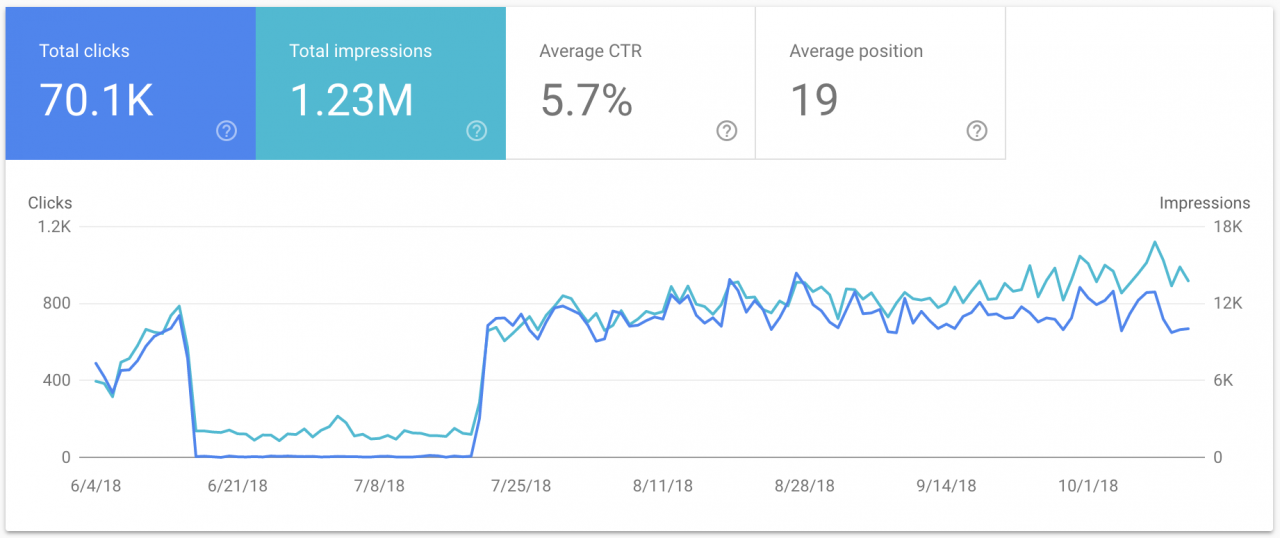
In the world of Search Engine Optimization (SEO), backlinks have always been the currency of trust. However, not all currency is legitimate. Just as a bank would flag counterfeit money, Google is exceptionally adept at flagging unnatural link profiles. If your website has been the target of negative SEO, or if you have inherited a toxic backlink profile from previous agency work, you are sitting on a digital time bomb.
The solution lies in a strategic process known as a Link Detox. This is not merely about removing links; it is a surgical procedure for your website’s ranking health. Performing a Link Detox incorrectly can be just as dangerous as ignoring the toxic links altogether. In this guide, we will explore precisely when you should consider a backlink audit, how to execute a Link Detox safely, and the common pitfalls that lead to ranking drops.
What Is a Link Detox and Why Does It Matter?
Before we dive into the technicalities, it is crucial to understand what a Link Detox actually entails. Contrary to popular belief, a Link Detox is not a penalty removal tool offered by Google. Instead, it is a manual process of auditing your backlink profile, identifying links that violate Google’s Webmaster Guidelines, and either removing them or disavowing them.
The Anatomy of a Toxic Backlink
Not every link that looks “spammy” is necessarily harmful. However, toxic backlinks usually share common characteristics:
- Irrelevant Websites: Links from sites in unrelated industries (e.g., a law firm getting links from gambling sites).
- Over-Optimized Anchor Text: An unnatural ratio of exact-match keywords.
- Low Authority: Links from sites with a spam score higher than 60% or sites that have been de-indexed by Google.
- Automated Links: Participation in link schemes, private blog networks (PBNs), or automated link exchanges.
If left untreated, these links can trigger algorithmic penalties (such as Google Penguin) or manual actions, resulting in a sudden drop in organic traffic.
When to Perform a Link Detox
Timing is everything. Performing a Link Detox on a healthy site can sometimes do more harm than good if you accidentally disavow valuable links. You should consider a Link Detox immediately in the following scenarios:
1. After a Google Manual Action
If you receive a notification in Google Search Console stating that you have a “Manual Action” due to “Unnatural links to your site,” you are on borrowed time. In this case, a Link Detox is not optional; it is a prerequisite for submitting a reconsideration request.
2. Following an Algorithm Update
If your traffic plummeted after a confirmed Google core update or the Penguin update, it is likely that the algorithm has identified your backlink profile as manipulative. A thorough Link Detox can help you recover by cleaning up the signals that the algorithm flags.
3. After Buying an Existing Domain
When you purchase an expired or pre-owned domain, you inherit its history. The previous owner may have engaged in black-hat SEO tactics. Conducting a Link Detox on an acquired domain ensures you start with a clean slate, preventing you from inheriting a penalty.
4. Sudden Traffic Drop Without Other Changes
If your on-page SEO is solid, your content is fresh, but your organic visibility is dwindling, a toxic backlink profile may be eroding your authority. A Link Detox can reveal whether negative SEO attacks or link decay are the culprits.
How to Conduct a Link Detox Safely
Performing a Link Detox requires a methodical approach. Acting impulsively by disavowing all links that look “ugly” can strip your site of its ranking power. Here is the safe, step-by-step method to conduct a Link Detox.
Step 1: Gather Your Backlink Data
You cannot fix what you cannot see. To begin your Link Detox, you need a comprehensive list of all sites linking to you.
- Google Search Console (GSC): Go to the “Links” section and export your top linked pages and top linking sites. This is the most accurate data source because it comes directly from Google.
- Third-Party Tools: Use SEO platforms like Ahrefs, Semrush, or Majestic. These tools often index more links than GSC, including links that Google might have discovered but not yet fully processed.
Merge these exports into a single spreadsheet. A successful Link Detox relies on having the complete picture, not just a snapshot.
Step 2: Categorize and Score Your Links
The core of a Link Detox is risk assessment. You need to categorize every backlink into one of three buckets: Toxic, Suspicious, or Safe.
Create columns in your spreadsheet for:
- Domain Authority (DA) / Domain Rating (DR): Low scores are red flags.
- Spam Score: Tools like Semrush or Moz provide a percentage likelihood of a domain being spammy.
- Anchor Text: Highlight links that use exact match commercial keywords (e.g., “cheap viagra” or “best SEO services”) excessively.
- Language & Location: If you run a local business in Texas, but 80% of your links are from Russian or Chinese forums, that is toxic.
Manually review the “Suspicious” bucket. A proper Link Detox requires human judgment; automated tools often flag high-authority sites like Forbes or Wikipedia incorrectly.
Step 3: Attempt Link Removal (Outreach)
Before using the disavow tool, you must attempt to clean up the mess. The disavow tool is a last resort. It tells Google to ignore links, whereas removing the link fixes the problem at the source.
For high-authority or relevant sites with one or two bad links:
- Find the contact information for the webmaster.
- Send a polite email requesting the removal of the specific link.
- Keep a log of your outreach attempts. Google expects you to try to remove links before disavowing them, especially when filing a reconsideration request after a manual action.
For links that are impossible to remove (such as those on expired domains with no contact info), you move to the final stage of the Link Detox: disavowing.
Step 4: Create and Format Your Disavow File
If you have concluded your Link Detox and still have a list of domains that refused to remove links or were unreachable, it is time to use the Google Disavow Tool.
Crucial Safety Tip: Do not disavow individual URLs if you can avoid it. Disavow entire domains.
- Domain format: domain:spamdomain.com
- URL format: http://spamdomain.com/bad-link.html
A common mistake during a Link Detox is disavowing the root domain when only one specific page was toxic. If you disavow the entire domain, you block any future, potentially high-quality links from that domain.
Here is an example of a clean disavow file:
text
# Link Detox conducted on [Date]
# Toxic links identified via Google Search Console and Semrush
# Entire domains to disavow due to high spam score and irrelevance
domain:cheap-pbn-links.net
domain:auto-blog-comments.ru
domain:gambling-seo-site.org
# Specific URLs to disavow (use sparingly)
http://example-forum.com/user-profile.php?id=1234
Step 5: Upload to Google Search Console
Upload your file to the Disavow Tool in Google Search Console. Select the correct property (ensure you are managing the right domain version, i.e., https or http, www or non-www).
After uploading, the Link Detox process enters a waiting period. Google will crawl the disavowed links again. It can take several weeks for the disavow to reflect in your rankings. Do not continuously upload new files every day; wait at least 2 to 3 weeks to assess the impact.
Post-Detox: Monitoring and Recovery
Completing a Link Detox is not the end of the road. It is the beginning of a recovery phase. After you have disavowed the toxic links, you must actively work to rebuild your profile.
Building Positive Link Equity
A Link Detox removes the negative weight, but it does not add positive weight. To see your rankings rise again, you need to acquire high-quality, contextual backlinks from reputable sites.
If you are looking for safe, high-quality platforms to acquire editorial backlinks or guest post opportunities, it is essential to work with services that prioritize quality over quantity. You can find comprehensive resources and vetted opportunities to help rebuild your link profile at Premium Link Post. By focusing on organic growth and authoritative placements, you ensure that your next Link Detox is years away, not months.
Re-Submit Reconsideration Requests
If your Link Detox was prompted by a manual action, you must submit a reconsideration request. In your request, be transparent:
- Acknowledge the unnatural links.
- Explain that you performed a thorough Link Detox.
- Attach your outreach logs (attempts to remove links).
- Attach your final disavow file.
- State that you have cleaned up the site and will adhere to Google’s guidelines moving forward.
Common Link Detox Mistakes to Avoid
Even seasoned SEO professionals make mistakes during a Link Detox. Avoiding these errors can save your website from unnecessary traffic loss.
1. Disavowing Too Early
You should never disavow links before you have attempted to remove them. If you disavow a link that could have been simply edited (changing the anchor text from “cheap pills” to your brand name), you lose a potentially valuable referring domain. A Link Detox should always prioritize manual removal over disavowing.
2. Disavowing Good Links
It is surprisingly easy to disavow high-authority links during a Link Detox if you rely solely on automated scores. For example, a site like The New York Times might have a high “Spam Score” in some tools due to user-generated comments, but a link from them is gold. Always whitelist high-authority, editorial domains before finalizing your disavow file.
3. Ignoring the “NoFollow” Attribute
Google largely ignores nofollow links in terms of ranking calculations. If you spend your entire Link Detox focusing on nofollow links from forums and blog comments, you are wasting time. Focus your energy on dofollow links from low-authority domains.
4. Neglecting Internal Links
While a Link Detox focuses on external backlinks, sometimes a site’s issues stem from internal linking structure. Ensure that during your detox, you also audit your internal links to ensure you aren’t leaking authority to orphaned pages or using spammy internal anchor text.
Advanced Strategies for Link Detox
For enterprise websites or those recovering from severe penalties, a standard Link Detox may not be enough. Here are advanced considerations.
The Niche Edit Cleanup
Sometimes, toxic links are “niche edits” inserted into existing articles on high-authority sites. For example, a hacker or a malicious SEO might inject a link to your site into an old .edu article. These are harder to find because the domain looks safe, but the context is spammy. Your Link Detox must include a contextual review—looking at the surrounding content of the link, not just the domain.
Using Historical Indexing
If you are performing a Link Detox on a very old domain, you might find that many links exist in the index but the pages no longer exist (404s). While these links are technically “dead,” they still exist in Google’s historical data. If these dead links are toxic, they still count against you. You must disavow them even if they lead to a 404 page.
YMYL Niches
If your website is in a “Your Money or Your Life” (YMYL) niche (finance, health, legal), Google holds you to a higher standard. In these niches, a Link Detox must be incredibly strict. Even one or two toxic links in a YMYL niche can cause a catastrophic drop in E-E-A-T (Experience, Expertise, Authoritativeness, Trustworthiness) scores.
Conclusion
A Link Detox is one of the most powerful tools in an SEO’s arsenal, but with great power comes great responsibility. When performed safely and methodically, it can resurrect a dying website, lift manual penalties, and restore organic traffic. When done carelessly, it can strip away the very authority that helps you rank.
Remember the golden rules: exhaust all removal outreach before disavowing, always disavow at the domain level unless absolutely necessary, and never rely solely on automated tools to make the final decision. By following the framework outlined in this guide, you can ensure that your Link Detox serves as a protective shield for your digital assets rather than a self-inflicted wound.
To maintain a healthy link profile after your detox, focus on building sustainable, high-quality links. For guidance on where to find reputable linking strategies and to explore vetted opportunities, feel free to check out our detailed blogs and resources that cover advanced white-hat link-building techniques. A clean profile combined with proactive link acquisition is the ultimate formula for long-term SEO success.